اطلاعیه

 برگزاری کلاسهای نرم افزار ویژه ی معماری و طراحی صنعتی در اصفهان

توسط اساتید مجرب و مورد تائید دانشگاه هنر اصفهان و موسسات آموزش عالی رده ی اول استان.

به اطلاع می رساند گروه طراحی ناتک هم اکنون اقدام بهبرگزاری کلاسهای آموزشی ویژه ی معماری و

 طراحی صنعتی به صورت خصوصی و عمومی نموده است.

عناوین کلاسها شامل :

1- 3d Max+Vray تخصصی معماری و طراحی صنعتی

2- Rhino تخصصی معماری و طراحی صنعتی

3- Revit تخصصی معماری

4-Auto cad

5- solid works تخصصی طراحی صنعتی و مکانیک

6- Sketchup تخصصی معماری

7- keyshot تخصصی طراحی صنعتی

8- Hypershot تخصصی طراحی صنعتی

جهت رزرو و ثبت نام  اینجا کلیک کنید

ثبت نام

Audi A6

Audi A6 تمرين نهايي درس طراحي با كامپيوتر زيرنظر استاد نيكخو

اجرا : کمال الدین فاطمی

Gemvision Matrix 3D 6.0 SR2 x32/x64

امروزه نرم افزارهای بسیاری در زمینه طراحی در موضوعات مختلف را می توان یافت که به وسیله آن ها کاربران می توانند در زمینه شغلی خود افزایش کیفی بسیاری داشته باشند. نرم افزارهایی که با شبیه سازی های کامپیوتری و انجام مراحل مختلف تست می توانند علاوه بر طراحی نقاط ضعف و معایب کار کاربر را نشان دهند. یکی از صنایعی که در آن طراحی یکی از مهمترین قسمت های انجام یک پروژه می باشد صنعت جواهرات سازی می باشد. طراحی جواهرات یکی از موضوعاتی می باشد که در آن علاوه بر رعایت اصول طراحی می بایست خلاقیت بسیاری به خرج داد تا نتیجه کار برای مشتریان رضایت بخش باشد.

در این مطلب نرم افزاری را در این زمینه به شما معرفی می کنیم.

Gemvision Matrix 3D نام نرم افزاری قدرتمند در زمینه طراحی جواهرات با ویژگی ها و امکانات متعدد برای جواهرسازان می باشد تا به کمک این نرم افزار و ابزارهای موجود در آن اقدام به طراحی و ساخت جواهرات زیبا و سفارشی مشتریان خود و شبیه سازی طرح نهایی به صورت کاملا سه بعدی نمایند. این نرم افزار قدرتمند کاربر را قادر می سازد تا جواهر مورد نظر خود را همانند محیط و واقعی طراحی و ساخته و نتیجه کار را نمایش دهد ، جواهر ساز در صورت تمایل نسبت به نتیجه کار خود می تواند طراحی خود را در محیط واقعی نیز پیاده کند. این نرم افزار محصولی از Gemvision Software می باشد.

برخی از ویژگی های این نرم افزار عبارتند ازGemvision Matrix 3D 6.0 SR2 x32/x64 - 9/1/2010 :

- توانایی طراحی حرفه ای جواهرات
- قابلیت اعمال انواع سلیقه ها بر روی طرح با استفاده از ابزارهای حرفه ای که قابلیت این کار را به کاربر می دهند.
- نمایش طرح به مشتری به وسیله نرم افزار قبل از انجام عملیات نهایی ساخت جواهر براب سفارش داده شده
- دارای رابط کاربری بسیار مناسب
- دارای کتابخانه حرفه ای برای انجام طراحی سریع با طرح های پیش نهادی
 و ... .

ادامه نوشته

RhinoCAM PRO v2.0.2.14 Final Release

RhinoCAM PRO v2.0.2.14 Final Release

ادامه نوشته

RhinoGold 1.0 - Training Material

RhinoGold 1.0 - Training Material

فیلم آموزشی

ادامه نوشته

466 Vray Materials (vismat) for Rhino and SketchUp

466 Vray Materials (vismat) for Rhino and SketchUp

۴۴۶ ماده برای راینو و اسکچ آپ

ادامه نوشته

Rhinoceros 4.0 SR7 Update Only

Designed in Rhino. Start with a sketch, drawing, physical model, scan data, or only an idea Rhino provides the tools to accurately model and document your designs ready for rendering, animation, drafting, engineering, analysis, and manufacturing or construction. CAD\CAM To be an effective designer today, you need tools to quickly develop your designs and accurately communicate them to everyone in the product research, development, marketing, and manufacturing or construction process.


Rhino can create, edit, analyze, document, render, animate, and translate NURBS curves, surfaces, and solids with no limits on complexity, degree, or size. Rhino also supports polygon meshes and point clouds. Rhino offers:

Uninhibited free-form 3-D modeling. Tools like those found
only in products costing 20 to 50 times more. Accurately
model any shape you can imagine.

Extreme precision. Design, prototype, engineer, analyze,
document, and manufacture anything of any size no matter how small or how large.

OS: Windows All (2000/XP/Vista)
Interface: English
Medicine in the archive


ادامه نوشته

VTC - Rhino 3D Tutorials

VTC - Rhino 3D Tutorials

VTC - Rhino 3D Tutorials | 536 MB

Start with a sketch, drawing, physical model, or only an idea - Rhino Version 3.0 provides the tools to accurately model your designs ready for rendering, animation, drafting, engineering, analysis, and manufacturing. Rhino can create, eidt, analyse, and translate NURBS curves, surfaces, and solids in Windows. There are no limits on complexiity, degree, or size. Rhino also supports polygon meshes and point clouds. From the Introductory guide, to creating your own 3D characters, VTC author, Brian Hull, guides you through all levels of Using Rhino.

3D scenes for publishing to the Web or print, design textures for modelers, create shapes using modelers, create shapes using modelers, add special effects, animate a scene, and much more. Available for both Mac and PC, Carrara 4 is essential for the graphic designer, 3D artist, or hobbyist looking to take their creativity to the next level.

Use UltraISO for mount *.isz

ادامه نوشته

RhinoGold v1.0.2

RhinoGold v1.0.2

RhinoGold is the preferred software for jewelry design and manufacturing. RhinoGold makes it possible for jewelry designers and manufacturers to fully modify and manufacture jewelry precisely but quickly without sacrificing a clear and intuitive interface that both simplifies and cuts down learning time.

ادامه نوشته

VTC Course - Rhino 3D Tutorials (Rhinoceros Rhino Training Course)

VTC Course - Rhino 3D Tutorials (Rhinoceros Rhino Training Course)

Start with a sketch, drawing, physical model, or only an idea—Rhino Version 3.0 provides the tools to accurately model your designs ready for rendering, animation, drafting, engineering, analysis, and manufacturing. Rhino can create, edit, analyze, and translate NURBS curves, surfaces, and solids in Windows. There are no limits on complexity, degree, or size. Rhino also supports polygon meshes and point clouds. From the Introductory guide, to creating your own 3D characters, VTC author, Brian Hull, guides you through all levels of using Rhino. To begin learning today, simply click on one of the Rhino 3D lessons.

Rhinoceros Rhino 3D Training Tutorial
Author: Brian Hull

Duration 8 hours
Number of Videos 126


Start with a sketch, drawing, physical model, or only an idea—Rhino Version 3.0 provides the tools to accurately model your designs ready for rendering, animation, drafting, engineering, analysis, and manufacturing. Rhino can create, edit, analyze, and translate NURBS curves, surfaces, and solids in Windows. There are no limits on complexity, degree, or size. Rhino also supports polygon meshes and point clouds. From the Introductory guide, to creating your own 3D characters, VTC author, Brian Hull, guides you through all levels of using Rhino. To begin learning today, simply click on one of the Rhino 3D lessons.


ادامه نوشته

T-SPLINES v2.0 FOR RHINO

T-SPLINES v2.0 FOR RHINO

T-Splines v2 for Rhino has many significant improvements, focused on three areas:
1. Creating smooth, organic models,
2. Editing them quickly, and
3. Exporting them for manufacturing without remodeling.
1. Create smooth organic models

T-Splines models are truly watertight, and even complex models can be created as a single surface. Mechanical detailing can be done with Rhino. Read more.
smooth
2. Edit quickly

Editing is done with a manipulator that can push and pull, rotate, and scale parts of the T-splines surface. Whether T-splines points are moved an inch or a mile, the surface will maintain outstanding continuity and not tear apart.

Many T-splines commands, such as extruding edges, deleting faces, subdividing faces, and extruding faces are popular techniques used in the animation industry for their speed. T-Splines brings these commands into industrial design for the first time, with one critical improvement. With T-Splines, you can add detail to a model, and the surface doesn\’t change or warp until you move the control points. Read more.
smooth
3. Export for manufacturing without remodeling

T-splines designs can be exported for manufacturing without needing to be remodeled. This is because all T-splines can be converted exactly to smooth, water-tight manufacturable NURBS. This is a push-button operation.

T-splines can be manufactured by any machine that reads in Rhino .3dm files. T-Splines can also be exported to solid modelers like SolidWorks.

ادامه نوشته

Rhinoceros 5 WIP x32,64 (2009-09-17

Rhinoceros 5 WIP x32-64 (2009-09-17)

Best Nurbs modeling software. 64-bit Windows Supported:
The 64-bit version of Rhino 5.0 can use as much system memory as is available from the operating system. This allows you to open and edit models that are much larger than you could edit in Rhino 4.0. Now it is supported fully by nVidia/ATI GPU OpenGL standard.
The 32- and 64-bit versions of Rhino can be installed and run on the same computer at the same time.
Backward Compatible:
Rhino 4.0 Plug-ins will load and run in the 32-bit version of Rhino 5.0. Plug-ins will need to be recompiled for the 64-bit version of Rhino by the plug-in developer. Until they’re ready, you may need to run the 32- and 64-bit versions of Rhino 5.0 side by side.
New Features:
Many Rhino Labs plug-ins have been included in this Rhino 5.0 WIP. Plus several other new features have been added. A list is available on the What’s New in Rhino 5.0 WIP page.

ادامه نوشته

Rhinoceros 4 SR6+Vray For Rhino SR 1.5
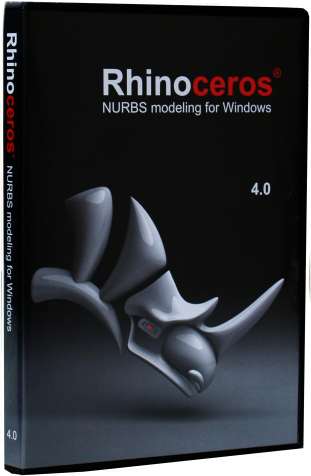
Rhinoceros 4 SR6+Vray For Rhino SR 1.5

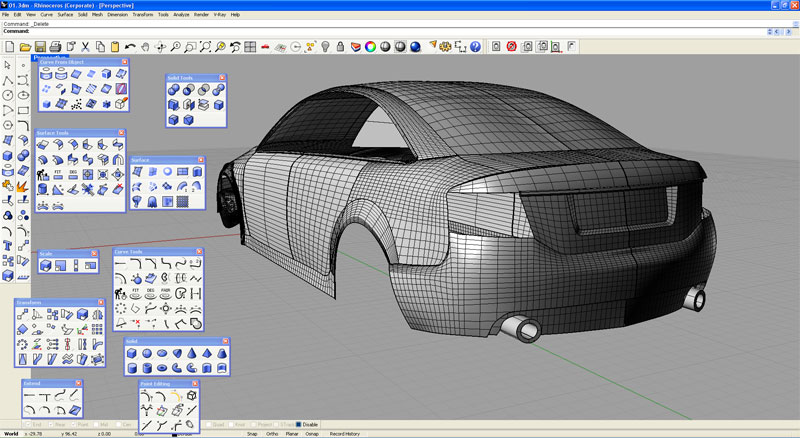
To be an effective designer today, you need tools to quickly develop your designs and accurately communicate them to everyone in the product research, development, marketing, and manufacturing or construction process.

Rhino 4.0 is the most significant upgrade in the history of Rhino, with hundreds of new features and enhancements.-Modeling enhancement include robust variable blend tools, improved Booleans, and G-infinityâ„¢ blending.

-Editing new features include UDT for free-form deformation of all geometry types, feature recognition for solids editing and history for editing surfaces by changing their input curves.

-Interface enhancements including SmartTrackâ„¢ technology, heads up prompts, advanced tooltips, and live help with video clips. Details.

-Display enhancements take advantage of the latest graphic card technology to provide a major speed improvement, custom advanced display modes, new analysis tools, dual-screen support, and stereo.

-Rendering and animation enhancements including faster basic rendering, advanced texture mapping tools, updated Flamingo and Penguin, Brazil r/s, and new third-party renderers from V-Ray …

-2-D drawing/drafting tools including line styles, line weights, hidden lines, dimensions, hatching, page layout and printing/plotting.

-Mesh modeling, editing, analysis, repair, and rapid prototyping. Major enhancements in mesh creation and editing. Also many new tools for STL repair and 3-D printing.

-Analysis with new tools for both measurement and display. Also enhanced tools detecting problems and evaluating model quality so the problems downstream can be avoided.

-Large projects support with hierarchical layer management, file locking, and enhanced support for worksessions, blocks, and reference files.

-Compatibility enhancements including improved PDF, AI 8+, STEP, DWG/DXF, PLY, DGN, FBX, SolidWorks, Google Earth, SketchUP, and WAMIT support.

-Software developer tools for users and third-party developers include an update C++ SDK, a new .NET SDK, and a new rendering SDK.

ادامه نوشته

Rhino Visual Tips 4.0

Rhino Visual Tips 4.0


Rhino Visual Tips 4.0 DVDR

Rhino Visual Tips 4.0 is a tutorial DVD with more than 450 video clips designed for either instructor-led or self-paced learning. Sixteen chapters with more than 14 hours of videos, will provide instructions on how to set up the interface, how to use the drawing, editing, modeling and transform tools, how to use the 2D and drafting commands, how to obtain vital information like model analysis and repair as well as advanced features like history, UDT and print layouts.

ادامه نوشته

V-Ray for Rhino 4.0

V-Ray for Rhino 4.0

V-Ray_for_Rhino_Manual_Scenes

Material_Vray_for_Rhino

&...

V-Ray for Rhino is a rendering plug-in that enables Rhino users in all fields from engineering and architecture to design and animation to take advantage of the Chaos Group's V-Ray rendering solution.

V-Ray offers visualisation professionals a state of the art solution that generates high quality images of unparalleled realism. Major studios in all disciplines have trusted V-Ray for years to generate photo realistic images of outstanding quality.

V-Ray is the perfect solution for global illumination and achieves professional results whilst maintaining very fast rendering times.

Now with V-Ray for Rhino 4.0, rendering options are easier with default render settings reflecting correct settings for indirect illumination, V-Ray Sun, V-Ray Sky and sampling levels.

For larger projects, V-Ray supports distributed rendering allowing a single image to be processed over up to 10 machines.

V-Ray for Rhino 4 v 1.5

Current V-Ray for Rhinoceros 4 users can now update their version of V-Ray free of charge and Render in DesignTime™.

This service release offers several additional features, including the much anticipated V-Ray Toon material, expanded render channels and extra light options. In addition, this service release also addresses several bug fixes.

"We are very excited to bring this Service Release to our customers", said Damien Alomar, Product Manager for ASGvis, the makers of
V-Ray for Rhino."This release continues to add features and clear up issues that will offer a marked improvement in render quality and workflow for V-Ray"

دانلود از ادامه مطلب

ادامه نوشته

Rhinoceros 3D Jewelry Designer Manager Pro

Rhinoceros 3D Jewelry Designer Manager Pro

اینهم هدیه ای ارزشمند

ادامه مطلب

ادامه نوشته

دوره آموزشی نرم افزار راینو

با توجه به درخواست دانشجویان عزیز در مورد برگزاری دوره آموزشی نرم افزار RHINO و در ادامه  کارگاه آموزشی برگزار شده در اسفند ماه

توافقات اولیه جهت برگزاری اولین دوره آموزش این نرم افزار انجام شد.

-استاد این دوره آموزشی جناب آقای سیروس حامدی فر (از اساتید حاضر در دومین همایش و کارگاه آموزشی تخصصی گروه طراحی صنعتی دانشگاه هنر اصفهان و مدرس این نرم افزار در دانشگاه تهران ) و زمان برگزاری این کلاس احتمالا روزهای چهارشنبه و در چند گروه خواهد بود.

-برگزاری کلاس در صورت به حد نصاب رسیدن تعداد افراد ثبت نام شده می باشد

خواهشمند است افرادی که تمایل به حضور در دوره آموزشی فوق را دارند هر چه سریعتر اسامی خود را اعلام نمایند.

-آخرین نسخه نرم افزار راینو را در ادامه مطلب می توانید دانلود کنید.

ادامه نوشته

آموزش Rhino تصویری

در اینجا آموزش Rhino تصویری رو قرار دادیم.

دانشجویان طراحی صنعتی اصفهان میتونن دانلود شده آموزش رو دریافت کنند.

دانلود در ادامه مطلب

ادامه نوشته